
Top 10 Wi-Fi Mistakes Nigerians Make (And How to Fix Them)
Slow Wi-Fi, constant buffering, and spotty connections are daily frustrations for many Nigerians. While internet service providers play a role, many connection problems stem from simple mistakes in how Wi-Fi is set up or used at home.
This guide highlights the top 10 Wi-Fi mistakes Nigerians make and practical steps to fix them, helping you enjoy faster, more stable internet, perfect for work, streaming, gaming, and staying connected.
Whether you’re a student, professional, or small business owner, understanding these pitfalls will save time, frustration, and ensure your Wi-Fi performs at its best.
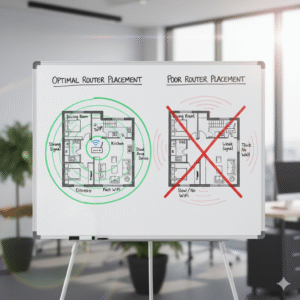
1. Placing Your Router in a Poor Location
Why It’s a Problem
Wi-Fi signals weaken when the router is blocked or positioned poorly. Corners, cabinets, and areas near metal objects can reduce coverage.
How to Fix It
-
Place your router centrally in your home.
-
Keep it elevated on a shelf or table.
-
Avoid placing it near microwaves, cordless phones, or thick walls.
2. Using an Outdated Router
Why It’s a Problem
Old routers may not support modern Wi-Fi standards or high-speed fiber connections, resulting in slow or unstable internet.
How to Fix It
-
Upgrade to a newer router that supports dual-band or Wi-Fi 6.
-
Regularly update router firmware to improve performance and security.
3. Ignoring Band Selection (2.4GHz vs 5GHz)
Why It’s a Problem
The 2.4GHz band travels farther but is slower, while 5GHz is faster but covers shorter distances. Using the wrong band can limit speed.
How to Fix It
-
Use 5GHz for high-speed devices like smart TVs, gaming consoles, or laptops.
-
Use 2.4GHz for devices farther from the router.
4. Too Many Devices Connected
Why It’s a Problem
Each device consumes bandwidth, reducing speed for everyone. Nigerian households often have multiple phones, tablets, and smart devices connected simultaneously.
How to Fix It
-
Disconnect devices not in use.
-
Schedule heavy downloads for off-peak hours.
-
Consider a dual-band router to balance device traffic.
5. Overlooking Security Settings
Why It’s a Problem
Unsecured networks can allow neighbors or intruders to connect, slowing your internet and compromising privacy.
How to Fix It
-
Use strong passwords and WPA3 encryption if available.
-
Regularly change Wi-Fi passwords.
-
Monitor connected devices through the router dashboard.
6. Ignoring Router Placement Relative to Devices
Why It’s a Problem
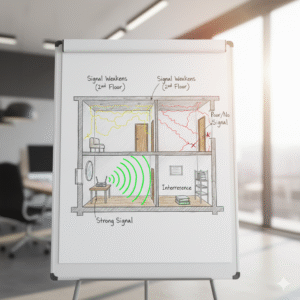
Devices blocked by walls, furniture, or floors get weaker signals, causing inconsistent speeds.
How to Fix It
-
Keep routers elevated and in open spaces.
-
Use Wi-Fi extenders or mesh networks for large homes.
7. Not Updating Device Wi-Fi Settings
Why It’s a Problem
Old device drivers, operating systems, or misconfigured network settings can slow down internet speeds.
How to Fix It
-
Keep devices updated with the latest software.
-
Check network settings to ensure optimal performance.
8. Skipping Speed Tests
Why It’s a Problem
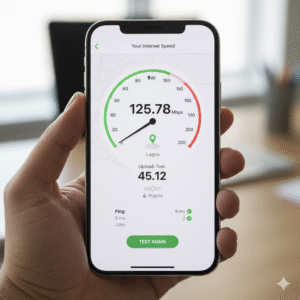
Without testing speeds, users can’t identify slow connections, data throttling, or ISP issues.
How to Fix It
-
Use speed test tools like Ookla, Fast.com, or ISP-provided apps.
-
Compare results against your internet plan’s expected speed.
9. Allowing Background Apps to Consume Bandwidth
Why It’s a Problem
Streaming apps, cloud backups, or large downloads running in the background can significantly reduce Wi-Fi performance.
How to Fix It
-
Pause updates and downloads during peak usage.
-
Monitor bandwidth-heavy apps using router dashboards or device settings.
10. Not Considering Power Issues
Why It’s a Problem
Frequent power outages in Nigeria can affect router performance or cause abrupt disconnections.
How to Fix It
-
Use a UPS or power stabilizer to protect your router and maintain uptime.
-
Reset the router after outages to restore optimal performance.
Read: Power Outages & Internet Downtime: What Lulifiber Customers Should Know.
Wi-Fi problems often aren’t caused by your ISP alone, simple mistakes in placement, device setup, or usage habits can slow your internet. By avoiding these common mistakes, Nigerians can enjoy faster, more reliable Wi-Fi for work, learning, and entertainment.
Implementing these fixes ensures your internet runs at full potential and helps you get the most out of your home network.
Want smoother Wi-Fi at home? Test your setup, apply these fixes, and share your results in the comments. Subscribe to our newsletter for more home internet tips, troubleshooting guides, and expert advice!
